ERPNext · automation
The daily stock report writes itself and lands in your team's chat.
Scheduled reports, approvals, tasks and dashboards. All standard ERPNext, and almost never switched on.
- Customisation
- None. All of it ships with ERPNext
- Auto Email Report
- Daily, weekdays, weekly or monthly
- Formats
- HTML in the mail, or XLSX, CSV, PDF
- Rows per report
- Up to 100 by default
Standard ERPNext
Nothing on this page is a customisation. Every feature described here ships with ERPNext, and most of it is configured by somebody in your office rather than built by us. We are writing it down because it is standard, widely useful, and almost never switched on.
Auto Email Report
Auto Email Report takes a report you have already saved and sends it on a schedule. The settings, in the order the report meets them:
- Saved reportYour filters and your columns
- ScheduleDaily, weekdays only, weekly or monthly
- As whomRuns as a named user; that user's permissions apply
- FormatHTML in the mail, or XLSX, CSV or PDF
- InboxA list of addresses. Can skip sending when empty
Why "as whom" matters. Because the report runs as a named user, a regional manager can be sent a daily sales report that contains their region and nothing else, without anybody maintaining a separate report for each of them. Get it wrong, run everything as Administrator, and you have quietly emailed the whole company's figures to a branch.
By default the report carries up to a hundred rows, and it goes out once a day on the schedule your system runs on.
Reports in chat
An emailed report is better than a manually compiled one, and it still lands in an inbox with two hundred other things.
The version we actually run is Raven, Frappe's team chat, connected to the same ERPNext. The stock position or the day's sales appears in the channel the team already has open, where somebody can reply to it. We use this ourselves, against our own ERPNext, which is why we are comfortable recommending it.
Approvals
Two separate mechanisms in ERPNext, and they get confused. Workflow is the states a document moves through and who may move it; the document carries the state, so nobody has to remember where it got to. Notifications are what tells a human something is waiting: a condition on a document (submitted, changed, past a date) triggers a message.
- DraftAnybody may draft a purchase order
- Pending ApprovalA notification tells the approver
- ApprovedAbove a value, only two named people
Together they replace the pattern most businesses run on: an email asking for approval, a reply saying yes, and no record of either attached to the purchase order six months later when somebody asks who approved it.
A workflow with too many steps is worse than none. If every purchase order needs three approvals, people start raising them after the fact, and you have built a system that records fiction.
Tasks and projects
Tasks with an owner and a date, grouped into projects, with timesheets against them if you want costing.
Where this earns its place is not project management for its own sake. A task can be attached to the thing it is about (a customer, a work order, a service job), so the question "what is happening with this order" has an answer in the same system as the order.
Dashboards
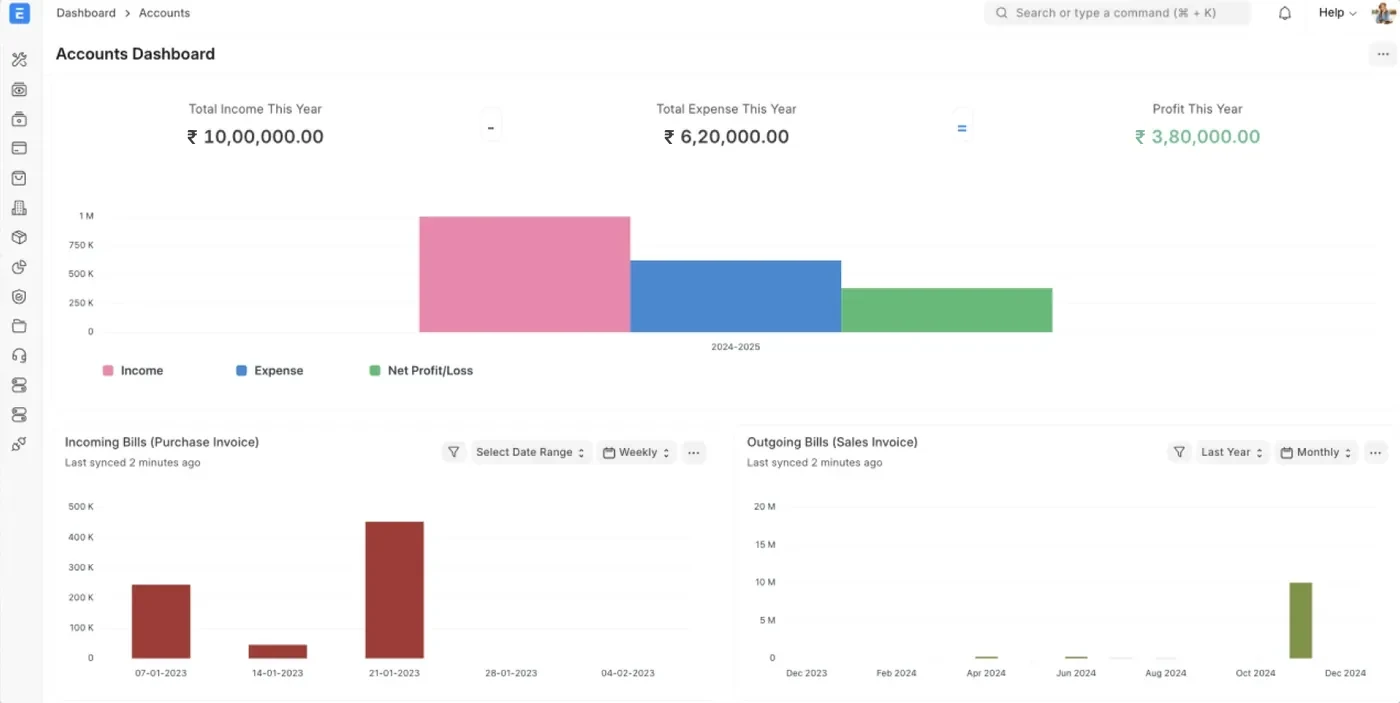
ERPNext ships three things that build a dashboard without code: Number Cardsfor a single figure, Charts for a trend, and Dashboardsthat arrange them into one screen. Filters and date ranges are set once and saved.
The figures a director checks daily, on one screen, without asking anybody.
What it is worth
Be concrete or say nothing. The honest measure is the number of hours a week somebody spends compiling something a computer could compile. In most businesses we have looked at, that is one person, one to three hours a day, on daily sales, stock position and outstanding.
Count yours before you decide this is worth doing. If it comes to twenty minutes a week, the automation is not the priority, and we would rather tell you that than configure it.
The second saving is the one people do not count. A report arriving at the same time every day, in the same shape, means the argument at the monthly meeting is about the business rather than about whose figure is right.
The limit
All of the above assumes the data is in ERPNext. If production is tracked in a register and only the invoice reaches the system, an automated report will faithfully report half a picture, on time, every morning.
That is not an argument against automation. It is an argument for fixing the data first, and it is the most common reason an automation project disappoints.
Talk to us
Call +91 98554 31488 and describe the report somebody in your office puts together every morning, and who reads it. Most of the time ERPNext already produces it and nobody has switched on the schedule. That conversation costs you nothing, and it is the one we would rather have first.
Tell us what breaks at month-end.
One call, your real books, no slide deck. You leave knowing what to fix first.
- Hours
- Mon-Sat, 10am-6pm IST
- Office
- Frontier Tower, 180, GT RoadMiller GanjLudhiana, Punjab
Thanks, we have it.
Your enquiry is with us. We reply within one working day, on the phone number or email you gave.