Skip to content

Tally · licence, cloud, support

Everything your business needs. All in TallyPrime.

From billing to inventory to VAT, with plans from AED 78 for 1 month.

Current release
TallyPrime 7.2

New in TallyPrime 7.2

Release

7.2

If your TSS is current, the upgrade costs nothing extra.

  • Exchange e-invoices with the UAE e-invoicing system, one at a time or in bulk.From inside TallyPrime, through Tally's own service provider.
  • Review before you send.The Send for e-Invoicing report lists the transactions still waiting for an e-invoice.
  • Track every e-invoice by its status.In progress, generated, changed after exchange, or rejected by the e-invoicing system.
  • E-invoices for advance receipts, with VAT details.Nature of transaction, VAT rate, taxable and VAT amounts, and the reason for an exemption, on several lines in one receipt.
  • E-invoicing registration for Corporate Tax companies.For a company registered only for Corporate Tax.
  • More e-invoice details in masters and vouchers.Agency IDs and legal agency identifiers, and the reason for an allowance.

What TallyPrime does

Five stops, in the order money moves through a business. Steps marked TSS need an active TSS.

  1. Stock from the purchase to the finished good, valued the way you choose.
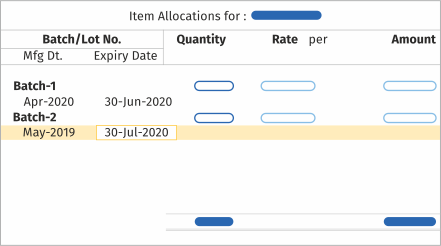
    Tally’s item allocation screen: two batches, each with a manufacturing and an expiry date.
    • Items and locationsGroups, categories, batches and locations, as many as the business has.
    • UnitsBuy in one unit and sell in another, with compound units and floating conversion.
    • Bill of materialComponents, quantities, by-products and scrap for each finished good.
    • Manufacturing journalRaw material consumed, finished goods out, scrap recorded in one entry.
    • Job workMaterial sent out and received back, from either side of the job.
    • Batch and expiryManufacturing and expiry date per batch, with days left shown.
    • Reorder levelsMinimum and reorder levels, and a report of what to buy and how much.
    • ValuationFIFO, LIFO, average, standard or last purchase cost, chosen per item.
  2. From the price list to the bill, and the outstanding it leaves behind.
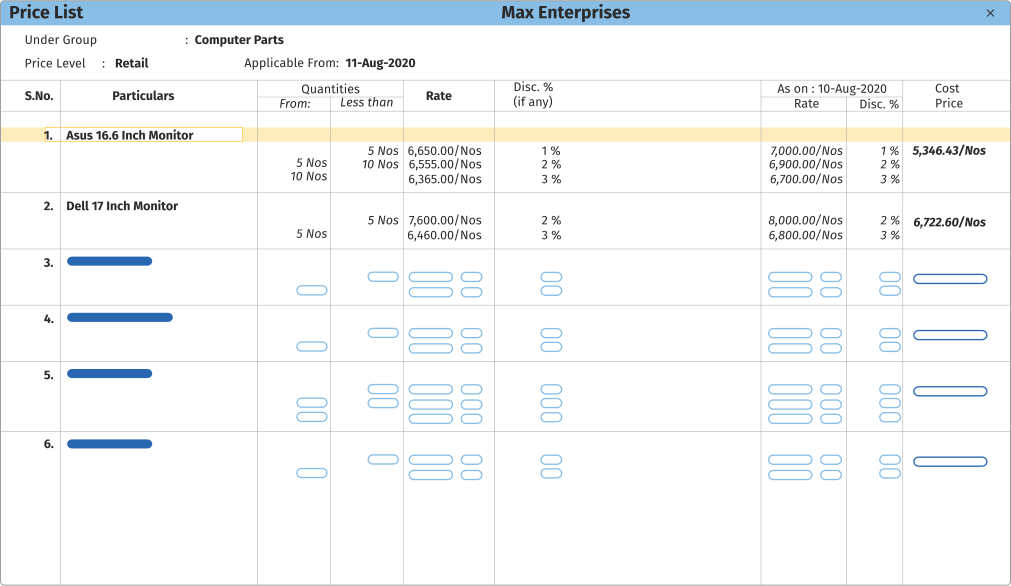
    Tally’s price list screen: items with quantity slabs, rates and discounts by price level.
    • Price levelsSeparate rates for wholesale and retail, with quantity slabs and discounts.
    • Order or directRun sales and purchase through orders, or bill straight away. Both work.
    • Invoice templateReady-made formats with your logo, watermark, address and terms. Goods and services billed in separate formats.
    • Foreign currencyQuote, bill and receive in another currency. Forex gain or loss is worked out for you.
    • Bills trackedSaving the invoice opens a bill reference, so receivables and payables keep themselves.
  3. VAT set up once and worked out on every voucher, through to the VAT 201.

    • VAT ratesRates set once on the item or ledger, and applied on every voucher.
    • Every kind of supplyDomestic, reverse charge, zero-rated, exempt, designated zone and intra-GCC.
    • Arabic invoicesTax and POS invoices in Arabic and English, or either one alone.
    • VAT 201 onlineUpload, submit and download the return on EmaraTax from inside Tally.
    • UAE e-invoicingE-invoices exchanged from inside Tally, one by one or in bulk, through Tally's own accredited service provider.
    • Errors caught firstThe return checked for mistakes before it goes out.
    • FTA audit fileThe audit file in the format the Federal Tax Authority prescribes.
  4. From the bank statement to a reconciled book, and payments out the other way.
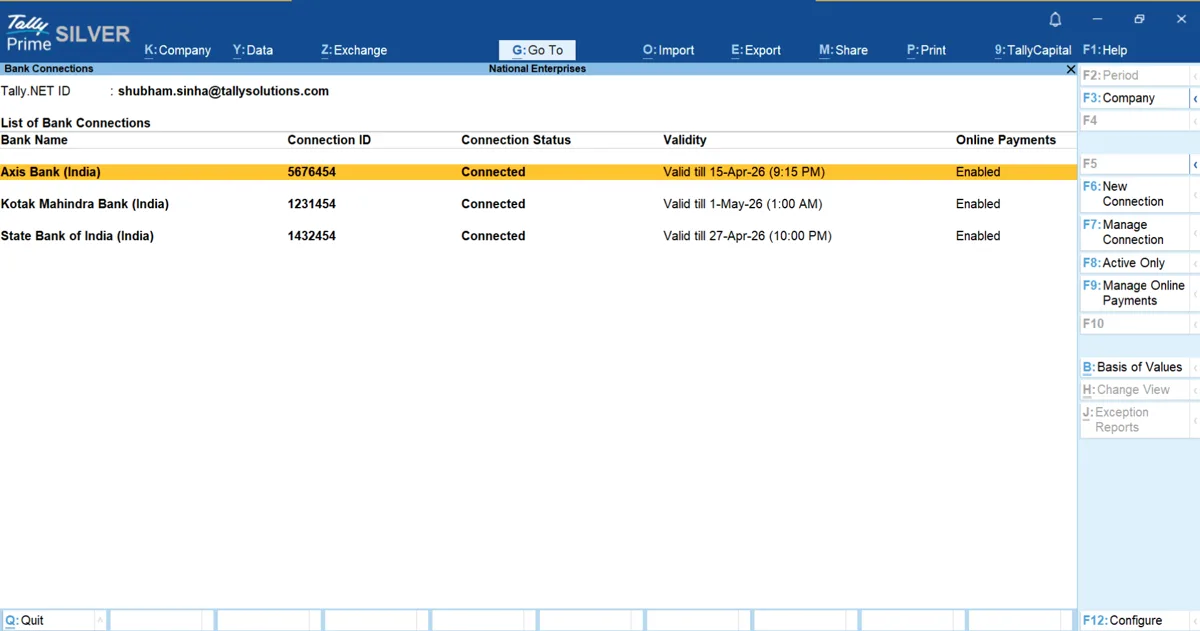
    Tally’s bank connections screen: Axis, Kotak and SBI accounts connected, with validity and online payments enabled.
    • Statement importImport the statement and Tally writes the payment and receipt vouchers.
    • ReconciliationAuto-reconciliation, with matches suggested for what is left.
    • ChequesSeveral cheque books per bank, printing formats for most banks, and a cheque register.
    • Deposit slipsCash and cheque deposit slips from the note denominations you enter.
  5. Who owes what, for how long, and what the bank balance will be next month.

    Tally’s report details screen: type of bills set to pending, overdue or due in the coming days.
    • Credit limitA limit per customer, and a warning on the invoice when bills are overdue.
    • Bill-wise outstandingEvery payment matched against the bill it settles.
    • AgeingOutstanding bills by how long they have been due.
    • InterestSimple or compound interest on overdue bills, posted to the books.
    • RemindersReminder letters, and how many days each customer takes to pay.
    • Cash flow projectionCash flow and funds flow statements, and a forecast for the period ahead.

Swipe for Invoicing and accounting

Stock from the purchase to the finished good, valued the way you choose.

  • Items and locations

    Groups, categories, batches and locations, as many as the business has.

  • Units

    Buy in one unit and sell in another, with compound units and floating conversion.

  • Bill of material

    Components, quantities, by-products and scrap for each finished good.

  • Manufacturing journal

    Raw material consumed, finished goods out, scrap recorded in one entry.

  • Job work

    Material sent out and received back, from either side of the job.

  • Batch and expiry

    Manufacturing and expiry date per batch, with days left shown.

  • Reorder levels

    Minimum and reorder levels, and a report of what to buy and how much.

  • Valuation

    FIFO, LIFO, average, standard or last purchase cost, chosen per item.

Tally’s item allocation screen: two batches, each with a manufacturing and an expiry date.

Swipe for UAE VAT

From the price list to the bill, and the outstanding it leaves behind.

  • Price levels

    Separate rates for wholesale and retail, with quantity slabs and discounts.

  • Order or direct

    Run sales and purchase through orders, or bill straight away. Both work.

  • Invoice template

    Ready-made formats with your logo, watermark, address and terms. Goods and services billed in separate formats.

  • Foreign currency

    Quote, bill and receive in another currency. Forex gain or loss is worked out for you.

  • Bills tracked

    Saving the invoice opens a bill reference, so receivables and payables keep themselves.

Tally’s price list screen: items with quantity slabs, rates and discounts by price level.

Swipe for Banking

VAT set up once and worked out on every voucher, through to the VAT 201.

  • VAT rates

    Rates set once on the item or ledger, and applied on every voucher.

  • Every kind of supply

    Domestic, reverse charge, zero-rated, exempt, designated zone and intra-GCC.

  • Arabic invoices

    Tax and POS invoices in Arabic and English, or either one alone.

  • VAT 201 online

    Upload, submit and download the return on EmaraTax from inside Tally.

  • UAE e-invoicing

    E-invoices exchanged from inside Tally, one by one or in bulk, through Tally's own accredited service provider.

  • Errors caught first

    The return checked for mistakes before it goes out.

  • FTA audit file

    The audit file in the format the Federal Tax Authority prescribes.

Swipe for Credit and cash flow

From the bank statement to a reconciled book, and payments out the other way.

  • Statement import

    Import the statement and Tally writes the payment and receipt vouchers.

  • Reconciliation

    Auto-reconciliation, with matches suggested for what is left.

  • Cheques

    Several cheque books per bank, printing formats for most banks, and a cheque register.

  • Deposit slips

    Cash and cheque deposit slips from the note denominations you enter.

Tally’s bank connections screen: Axis, Kotak and SBI accounts connected, with validity and online payments enabled.

Who owes what, for how long, and what the bank balance will be next month.

  • Credit limit

    A limit per customer, and a warning on the invoice when bills are overdue.

  • Bill-wise outstanding

    Every payment matched against the bill it settles.

  • Ageing

    Outstanding bills by how long they have been due.

  • Interest

    Simple or compound interest on overdue bills, posted to the books.

  • Reminders

    Reminder letters, and how many days each customer takes to pay.

  • Cash flow projection

    Cash flow and funds flow statements, and a forecast for the period ahead.

Tally’s report details screen: type of bills set to pending, overdue or due in the coming days.

How the VAT 201 is filed from TallyPrime →

And many more

  • Business reportsEvery report live, and every report a step from the next one.
  • PayrollFrom the employee master to the statutory return.
  • Connected servicesThe parts of Tally that reach outside your office.
  • SecurityWho can see what, who changed what, and the data locked underneath.
  • Business operationsRunning more than one set of books, and keeping all of them safe.
  • MobileBiz Analyst: orders, payments and entries from the phone, synced into Tally.

Plans and prices

Same software on every plan. The plan decides how you pay for it.

silverTallyPrime Silver: suitable for businesses that need TallyPrime on a single PC.

3 months

AED 234

Effective AED 78/month

Includes TSS. Renews until you cancel.

Ask for 3 months

12 months

AED 936

Effective AED 78/month

Includes TSS. Renews until you cancel.

Ask for 12 months

Lifetime

AED 2,340

Yours, no renewal. TSS is included for the first year, then AED 468 a year to keep it.

Ask for lifetime

Best ROI plan

goldTallyPrime Gold: perfect for businesses needing multi-user access on multiple PCs.

3 months

AED 702

Effective AED 234/month

Includes TSS. Renews until you cancel.

Ask for 3 months

12 months

AED 2,808

Effective AED 234/month

Includes TSS. Renews until you cancel.

Ask for 12 months

Lifetime

AED 7,020

Yours, no renewal. TSS is included for the first year, then AED 1,404 a year to keep it.

Ask for lifetime

Best ROI plan

Upgrade

Single user to multi user

Already on a Silver lifetime licence? Move it to Gold whenever you need more users. You pay the difference, not for a new licence.

AED 4,680

One-time payment. The licence stays lifetime.

  • Your data stays as it is
  • Same licence, no new one
  • Upgrade any time
Ask for the upgrade

Industry solutions

Custom Tally solutions for each business vertical.

Questions

Can I rent TallyPrime instead of buying it?

Yes. Tally rents TallyPrime in the UAE from AED 78 for 1 month, with TSS included. See the plans above.

What happens to my data if I stop paying TSS?

Nothing. The data sits on your own PC and stays yours. A lapsed TSS stops updates and the connected services, not your books.

Do I need an internet connection?

No. TallyPrime runs offline. The connected parts, VAT 201 filing and reports in a browser, need a connection and an active TSS.

Talk to us

Call +91 161 5044 180. Tell us how many people need Tally and what you run now, and we will tell you what to buy.

Tell us what breaks at month-end.

One call, your real books, no slide deck. You leave knowing what to fix first.

Hours
Mon-Sat, 10am-6pm IST
Office
Frontier Tower, 180, GT RoadMiller GanjLudhiana, Punjab
What you need (optional)

We reply within one working day. No mailing list.